Tech Hacks: Android Hacks
Showing posts with label Android Hacks. Show all posts

Saturday, 1 July 2017

Best Android Game Hacking Apps With/Without Root


Game Lovers??. 
Today is a lucky day for you. Because in this Post we are going to list out the top 8 Best Game Hacker Apps for your Android Device.


Playing Games on the Mobile device is one of the best ways to pass your free time. And surely the Android Operating System is the best choice for Mobile Gaming. Personally, I really love playing Games on my Android Mobile due to two main reason:

The First one being the number Games from varieties of the different genre that are available for us to feast on and the other reason being the flexibility that the Android OS offers for its users in terms of Gaming.

As a matter of fact, most of the Android Games are customizable to its core system. It means that you can hack into the Memory of any Android Games or Apps using the right tools.

The easiest and the most effective way to hack any Android Games is by using the Game Hacker Apps. But the problem that comes with this App is that most of this App don’t actually perform in the real world except for the few of the Apps.

So for all our readers, we will be listing out the best Game Hacker Apps for Android 2017 that would actually do the work right.

  • 1 Best Game Hacker Apps for Android Devices
    • 1.1 1. Xmodgames
    • 1.2 2. Cheat Engine
    • 1.3 3. GameCih
    • 1.4 4. Lucky Patcher
    • 1.5 5. Freedom App
    • 1.6 6. Creehack
    • 1.7 7. SB Game Hacker
    • 1.8 8. LeoPlay Card

Best Game Hacker Apps for Android Devices

Now Hacking the Android Games or Apps can be quite beneficial because using this hacker app for Android you can tweak with the System Memory of any App or Games. And you can hack any of the in-app Purchases and unlimited resources of Golds, Coins, Points, and much more.

So by using these Hacking Apps for Android, you will be able to create a whole new Mods for your favorite Android Games such as Clash of Clans, Subway Surfers, Mini Militia and much more.
Without anymore due let us jump into our list for the best hacking Apps for Android Games:

1. Xmodgames

XmodgamesXmodgames is one of the best game hacking app that will let you mod games on your rooted Android smartphone. It supports lots of popular games like Clash of Clans, Pokemon Go, Minecraft, Clash Royale and many others. One of the best features that we love about Xmodgames is its user-friendly interface which will pop over when you are playing the game.
The regular updates provided by the app developers will ensure the compatibility of the game hacker with the latest games. You can download Xmodgames from here. Let us know what you think about this app!

2. Cheat Engine

Cheat Engine App Cheat Engine App is certainly one of the best when it comes to providing tools for hacking Android Games. It is an Open Source App so you can download it for free on your Android Device.
You can use the Cheat Engine App to customize any of the Games features within few seconds and make all kinds of changes in the game including new Weapons, adding new Characters, Invisible Walls and much more. So when it comes to hacking games on Android device, the Cheat Engine for Android certainly comes on top of all other apps.

3. GameCih

GameCih app
Another contender on our list for the best game hacker Apps is the GameCih App. This Open Source free Android App allow the users to hack and modify most of the Android Games including both Online as well as Offline games to the user’s preference.
But the Problem with the GameCih App is that it requires Root access for the App to run on your device. This means that your device needs to be rooted to hack any games using the GameCih App. But apart from that, the GameCih App is a very powerful Android Software capable of providing different features that will let any users hack games easily.

4. Lucky Patcher

Lucky Patcher AppLucky Patcher is certainly not new to Android Users. It is certainly one of the best apps for Android not on play store, and not just for hacking Android games but for more.The Lucky Patcher Software allows users to remove ads, license verification and modify the memory of any games or Apps within few seconds to their needs. Lucky Patcher App is certainly the App for Hacking Offline Android Games and hacking any of the in-app Purchases for any games or apps. So if your device is rooted and you want to download an app that will help you hack games, then the Lucky Patcher App should certainly be one of your first choices.

5. Freedom App

Freedom AppThe next App in our list for Hacker App for Android is the Freedom App. If you want an Android App that can help you hack both the Android Apps and Games efficiently, then the Freedom is your go to App.
Freedom App for Android specializes in terms of hacking any of the In-App Purchases for any Android Games or Apps. As with the help of the Freedom App, you will be able to Purchase any of the Premium features for any Games or Apps from Google Play Store for free of cost. The Freedom App is quite useful for those guys who does not have international CC to create a Google Wallet.

6. Creehack

Creehack AppCreehack is another complete Android Apps and Games hacker tool that you would want to have on your Android device if you are into hacking.
It will allow the users to hack most of the online games as well as offline games for getting unlimited Golds, Coins, Points, Scores and much more. And if you want to bypass any Editors security for any Android Apps or Games then the Creehack App is also the best choice for you. This App is also an open source Software so you can download the Creehack App on your Android Device for free.

7. SB Game Hacker

SB Game Hacker AppSB Game Hacker another really popular hacking app among gamers who likes to have more freedom towards their Apps and Games. It allows the users to hack into the system of any games to increase the points and scores easily. You can also use the SB Game Hacker App to Modify the system of any games for Unlimited resources of Golds, Coins, Money and much more.
The SB Game Hacker can remove any of the annoying ads, bypass license restriction and much more. So it is certainly a whole package hacking tool for any Android App or Games. From here you can download SB Game Hacker and get on with hacking Android games.

8. LeoPlay Card

LeoPlay CardLeoPlay Card is yet another game hacker similar to Creehack which will let you play many Android games for free. One of the major thing that I loved about this app is that if doesn’t require your Android device to be rooted. Let us know what do you think about this app and which one is your favorite?

So that was it. These Hacking Apps for Android Games will surely help you to get an edge over your opponents, and it will surely make your gaming experience more interesting.

You may Like to check the following as well 


P.S: The Above list is not in any order. As the apps are listed as per my experience with the Apps. And you should note that all the Apps mention above are created almost keeping in mind the same purpose. So the Features of Apps tend to be quite similar to each other.
If we have missed any of your favorite Apps that you use for hacking Games, please share it with us in the Comment section below. Do Subscribe to us to get more Tech related Hacks.
Share:

Friday, 23 June 2017

ADVANTAGE AND DISADVANTAGE OF ROOTING YOUR ANDROID MOBILE

First Of All, What Does Rooting Your  Android Mean?

                       To root or not to root, this is the question. Most of you know that rooting means you have gained all the control over the entire system. You can download and use all of the tools and blocked features on your device. However, rooting your Android is not risk-free. To speak exactly, it's like a two-edged sword as with root access nothing is there to prevent some malicious apps from destroying your system. So what are the advantages and disadvantages of rooting your Android device? This is a must-have-to-know question before you choose to root your Android phone.


It's not to give you the conclusion whether you should root your device. Just make sure you have all side understanding of rooting.


Advantages of Rooting


For the benefits of rooting your device, I have introduced that before. You can have a look at the previous article. Even that, I still share the big advantages of rooting here:
1. Installing Custom ROMs
After rooting your device, you can flash a custom ROM or Kernel, which means you can have a new device.

2. Remove Preinstalled Crapware
The manufacturer won’t allow you to uninstall those preinstalled apps on your device. Rooting a device can make them removed easily, which ensures a high running quality.

3. Blocking Ads in Any Apps
Sick of the pop-up ads when playing games? A rooted device can remove these annoying ads immediately.

4. Install Incompatible Apps
Some wonderful apps need the root access if you install them on your device. Root your phone, enjoy more apps.

5. Keep Latest Android OS
A rooted Android can get the new OS months before the carrier releases the update, often along with a few bonus features.

6. Change Skin for your Android
As you can see, there are only 3 to 4 default skin on your device to change. But if you root your phone and install the new ROMs, you can enjoy the customized and tweaked skins on your device.

7. Boost your Android Device’s Speed and Battery Life
Some powerful apps like Greenify can close the useless applications automatically, which can effectively improve your device’s performance. Of course, Greenify needs root access.

8. Make Complete Backups of Your Android Phone or Tablet
A unrooted Android phone can only back up some settings and apps of your device. Titanium can be used on rooted device to give you a complete backup.

In one word, rooting can make you be the master of your Android phone. You can automate everything on your Android device.


Disadvantages of Rooting


Most of you may know more about the benefits of rooting, however, the disadvantages of rooting have not be noticed very. Viewing all of the pros and cons of rooting Android can be good for you to make decisions.

1. Root can Brick Your Device
Compared with un-rooted Android device, the rooted one faces a common threat from misoperations and sometimes you may turn your Android device into a brick.
Avoid this risk: Just download apps from a reliable place like Google play, and, do not delete the files if the files are suggested not to delete by rooting apps.

2. Say Good-Bye to the Warranty
The Android device manufacturers will not cover the damage after you rooting your device. For some brand, we can unroot the device after rooting, so, the manufactures don’t know if you have rooted your Android device or not. But to make matters worse, Android device manufacturers also go to great lengths to know if your device has been rooted!

3. Problems with Updates
Sometimes you root the Android phone to get latest OS but after rooting, you may find that the automatic updates to the firmware stopped. Updates fail to install due to software modifications that occurred while the distribution has been rooted.

Comparing with these pros and cons of rooting your Android device, then choose if you need to root your Android device or not.

When you root your android phone, you may need to connect your android phone to PC with USB cable, and enable the USB debugging mode, install driver for the phone and so on. If you want to root your phone, choose a easy-to-use app for one click root may help a lot! Here recommends iRoot software for you, which can make you root your device with one click. And it’s totally free. 


Share:

Thursday, 22 June 2017

How to Easily Root Your Android device

How to Root Android Device with KingRoot

I believe that you've heard the word "root" a lot from the geek guys. But do you know what exactly "root" is? Here we will give you a comprehensive introduction on what is "root", what to do before rooting and how to root Android devices with Kingo Root. Now let's know more details about "Root Android".


Note:
Verizon and AT&T have locked the Bootloader in Android, leading to difficulties in rooting Android and possibilities of bricking the device. So the solution we offer below may not works on  Android manufactured by Verizon or AT&T and it is better not root your phone with this method.
  • Part 1: What is "root"
  • Part 2: Precautions before Rooting Android
  • Part 3: Get Your Android Rooted via KingRoot on PC
  • Part 4: Steps to Root Android Device with KingRoot App

Part 1: What is "root"

In brief, "root Android" means getting the highest authority on Android and has access to better use your Android phone by optimizing your phone, and its data, etc.

Part 2: Precautions before rooting Android

Before you root your Android, you'd better do the things below in advance:
Back up your Android, in case you fail rooting your Android and need to recover your lost data, you need to have an backup file with you.
Make sure that your Android has at least 50% of battery remained. If unfortunately, your Android runs out of battery, the device is likely to turn brick.
Find a third-party root tool which provides less and easy steps with higher success rate freely, for example, KingRoot.
ALSO READ: ADVANTAGES OF ROOTING YOUR ANDROID PHONE

Part 3: Get Your Android Rooted via KingRoot on PC

Step 1. Launch the program - KingRoot after installing it.
Step 2. Connect your Android smartphone to PC via USB cable. When it asks you to set up debugging mode, please follow the guide. Otherwise, the connecting would fail.
Connect your Android  to PC
Step 3. As it is successful to get connected, the program will detect your phone to check whether it is supported.
Step 4. If your phone/tablet has not been rooted yet, just click “Start to Root” and the process will get started.
Start to Root
Step 5. In this process, your mobile will restart itself, which is normal. As there is a signal called “Successfully Gained Root” on the screen, your device is rooted.
Root is Done

Part 4: Steps to Root Android Device with KingRoot App

Note: You are not allowed to root your Android phone with Mac. For example, when you are intended to root your Android phone and then use our software - FonePaw Android Data Recovery for Mac, you can directly root on the Android phone with the below method.
Step 1. Run KingRoot on Android
Install KingRoot on your Android phone. Tap the icon of KingRoot. This will start the app. And you will have the interface as below. If your phone is unrooted, you can see the prompt saying that "Root access is unavailable". Then click the button "START ROOT".
Start Rooting with KingRoot

Step 2. Root Android with KingRoot
When rooting, you can view the progress. When it is done, you will see the big green tick icon. After that, you can remove apps, purify system, etc. with this app.
Root Successfully

As an open operating system, Android triggers a wide range of Android mobile brands and Android OS versions, we still have not found out a program which is 100% compatible for every Android phone or leads to absolutely successful rooting, particularly for Android 4.4 and the later. If both two programs fail to root your mobile, we suggest you turn to other solutions, please refer to: http://forum.xda-developers.com/.

Share:

Tuesday, 30 May 2017

Hack WIFI right from your Smartphone

How to hack Wi-Fi using your Android smartphone


Powered by The Emoji Media

You Can Hack Wi-Fi Network and Crack Wi-Fi Password Using Your Android Smartphone.If you are a security researcher or hacker, you must have used Kali Linux tools to hack Wi-Fi for pentesting. However one of the most common comments/questions from our readers is for hacking Wi-Fi using Android smartphones. Is it possible to hack Wi-Fi using Android? Yes! It is possible because Android kernel is based on Linux, therefore most of the tricks and hacks that are possible with Linux can be done with Android.

However, since Android smartphone is not as powerful as a PC, there are certain modifications needed and one of them is a rooted Android smartphone. Here are the some Apps which allow you to hack Wi-Fi passwords using your Android smartphone

Things You Need For Hacking WiFi from Your Android Smartphone

  • Android smartphone with Quad-core Processor and at least 2GB RAM
  • Your Android smartphone Must be Rooted
  • The Wi-Fi network signal you want to hack should be powerful

    Though many reviews may say this App is fake but this is a working App and can crack Wi-Fi passwords in minutes from your Android smarpthone. With this App you can hack Wi-Fi signals which  are WPS enabled.


WPS Connect bypasses WPS security and gives you access to to the Wi-Fi without typing any password.


 WiFi Kill works by disabling other users using the same Wi-Fi connection giving you the maximum bandwidth available on that particular network. Download Wi-Fi Kill and kill other users connections with this App.


    ZAnti is a hacking and pentesting tool from the house of Zimperium. ZAnti has been released as a complete mobile pentesting App but it is also capable of hacking Wi-Fi network password of your Android smarpthone.


 With this App you can hack into Wi-Fi networks to test their security as well as kill other connections pretty much like Wi-Fi Kill above. In addition to hacking Wi-Fi, ZAnti offers you many other pentesting options which you would love if your are a hacker/security researcher. 

WIFI WPS WPA Tester works on normal Android smarpthones if you want to just connect an WPS/WPA enabled Wi-Fi network without knowing the password. If you have a rooted Android smartphone, you can view the hacked password.


 This hack PINs which are calculated using following algorithms:
-Zhao
-TrendNet
-Dlink
-Arris.


Share:

Top 11 Android Hacking Apps

Hello Everyone!! 

                       Today you are going to start Hacking right from your mobile phone!! Yes its is possible. Below are the list of powerful Hacking tools available for your android phone

Note: These apps are not available in play store, you need to download it by searching the App name in google search. So Let's start,

Here are The Top 11 Android Hacking Apps:
1.Hackode:
Hackode is one for the best Android hacking app.
The hacker’s Toolbox is an application for penetration tester, Ethical hackers, IT administrator and Cyber security professional to perform different tasks like reconnaissance, scanning performing exploits etc.

Image result for Hackode

2. WhatsApp Sniffer:
This app works in tandem with the WhatsApp application. By using WhatsApp Sniffer one can hack private WhatsApp chats, pictures, audios and videos of friends who are using your WiFi Hotspot.
If most of the people connected to the same Wifi network .then you can easily read the Whatsapp Chat with the help of this app. Also, you can manipulate pictures, videos, account info.

Image result for Whatsapp sniffer

3. AndroRAT
AndroRAT, is for Remote Administration Tool for Android.
This is a client/server application developed in Java Android for the client side and in Java/Swing for the Server, which is used to control android system remotely and retrive informations from it.

Related image

4. APK Inspector:
APK Inspector, inspects the detailed properties of all apps installed on your device. Those properties are available to Android’s internal PackageManager, usually many of them are not exposed by system’s default user interface (such as Version code, Target SDK Version, etc).

Image result for Apk inspector


5. Eviloperator:
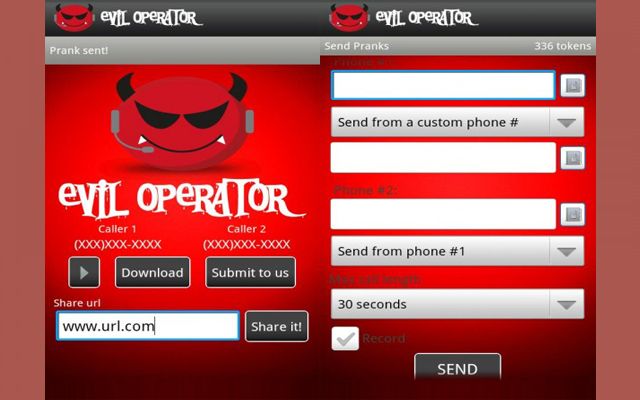
Eviloperator, which automatically connects two person in a phone call making them feel that they called each other and you can record and save the conversation.

Image result for evil operator

6. WiFi Killer:
It is a WiFi network controller app. This app is used to block a person who is using your WiFi network.
You can disable internet connection of any device that is using your network. This app is only for android and requires root access.

Image result for wifi killer

7. DroidSheep:
DroidSheep, is an Android application that analyzes security in wireless networks and also captures Twitter, Linked, Facebook, and other accounts.
This app can be easily used by anybody who has an Android device and only the provider of the web service can protect the users.

Related image

8. Burp Suite:
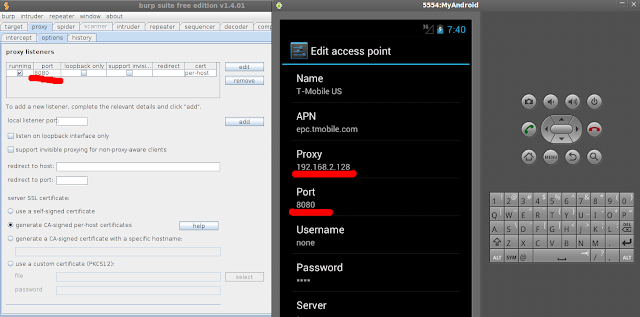
Burp Suite is an integrated platform for performing security testing of web applications.
Its various tools work seamlessly together to support the entire testing process, from initial mapping and analysis of an application’s attack surface, through to finding and exploiting security vulnerabilities.

Image result for burp suite android

9. dSpoilt:
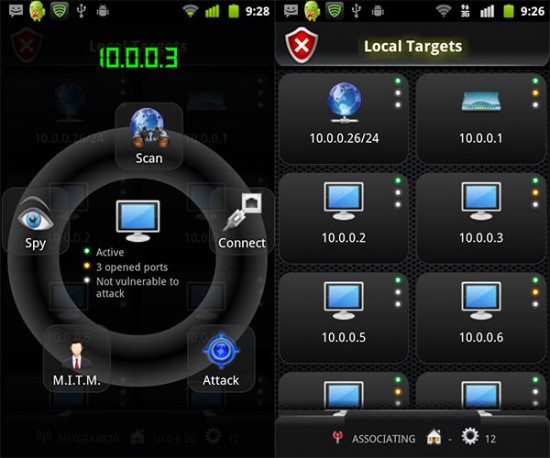
dSploit is an Android network analysis and penetration testing suite to perform network security assessments on mobile phones.
It is a complete toolkit so that you can perform various attacks like password sniffing, real time traffic manipulation, network mapping, vulnerability scanning, password cracking, Man-In-The-Middle attacks etc.

Image result for dsploit

10. AnDOSid:
AnDOSid is a tool designed only for security professionals to let them carry out DOS attack from your smartphones.
It is used to perform a DOS attack on websites or web servers.

Image result for AnDOSid

11. Nmap for Android:
Nmap (Network Mapper) is a port scanner tool. It is used to discover hosts and services on a computer network. It is capable of Host Discovery, Port Scanning, Service Name and Version Detection, OS Detection.
It is a popular network security scanner, which is also available for android devices. This works on both non-rooted and rooted phones. However, if your device is rooted then you have access to some more features. It allows you to scan networks for finding ports and system details.

Share:

The one-stop place to find all the answers for your tech queries and learn on how to hack Android, Wifi, Kali Linux, Dark Web, and much more.


Follow Us On Social-Media

Enter your email address:

Delivered by FeedBurner

Featured post

Top 11 Android Hacking Apps

Hello Everyone!!                          Today you are going to start Hacking right from your mobile phone!! Yes its is possible. Bel...